Posts

Showing posts with the label Project Accounting

Multicurrency Support in Project Accounting

Multicurrency is one important area and understanding it’s treatment in Project Accounting module of Dynamics GP is essential for a successful PA Implementation. Multicurrency is assigned in Billing currency ID in PA Originating currency is assigned for the contract first for it to be assigned to all projects under the contract. Later, the same currency is rolled on to projects. Currency for the contract and the currency for any or all of the projects under the contract cannot be different. Example: If Currency for Contract A is USD, Currency for Project A1 under contract A cannot be assigned to CAD and instead uses USD. Change orders are not supported by Multicurrency. In other words, change order tracking will be disabled if an originating currency other than functional currency is used in Contract as well as Project. Profit Types of Billing Rate and None are the only profit types that can be used on Multicurrency billing proj...
How to reverse Revenue Recognition transactions in Project Accounting

Image
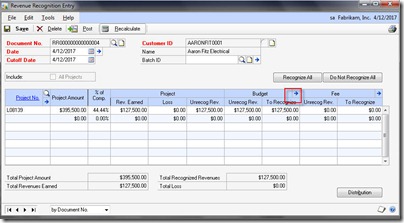
When the revenue is recognized for a project using Revenue recognition entry in Microsoft Dynamics GP Project Accounting module and if there is a situation where we would like to reverse the posted RR transaction. Here in this article, I put up the steps to do the same. 1. Make sure override RR amount is marked in PA | Billing | RR Options setup. Otherwise, the system wouldn’t allow us to change the amounts in RR entry window. 2. Open RR Entry window, Enter the customer ID and the Project ID for which revenue transactions that were posted earlier need to be reversed now. 3. Once the Project ID is selected, click the arrow next to Budget 4. Enter the negative amount in each cost category in To recognize field. If the amount is higher than the recognized amount, then the system wouldn’t allow doing that. 5.  Now Post the RR transaction so as to reverse the posted RR transaction.

Project Accounting – Retainer Fee Questions

Here in this post is a collection of Retainer Fee (Project Accounting Module) FAQ that would be of interest to everyone. Q . In billing entry, when attempting to add a tax schedule ID to a retainer type fee, we get the message:  “You can not enter a Tax Schedule ID for retainer fees” A . Tax Schedule ID for retainer fees cannot be entered in the Billing entry window. To add tax to a retainer fee billing invoice we need to go to Tools | Setup | Project | Billing, enable the option Retainer Fee taxable and then save the change. Then go to the fee setup window, select the retainer fee that is being used, and make sure that the tax option is either set to taxable and a tax schedule is inserted or the tax option is set to based on customer. The retainer fee billing invoice will now include tax when it is raised after these changes. Q . Is there a way to apply the Retainer after the fact? A . There isn’t a way to apply the retainer to the billing after the fact. The on...

Project Budgeting Questions

Image
Most of the clients ask us these common questions on Project Accounting whether it is during a Pre-sales activity or during an implementation cycle. During a recent discussion in Dynamics GP partner forums , Andy Sather from Microsoft has given great answers to these questions. I thought I'll put the same here. Q1: In Dynamics GP Project Accounting Module, Can we have zero budgets defined? Q2: In Dynamics GP Project Accounting Module, Can we modify the Baseline Project Budget Amounts? A1 : The answer to Q1 is partly yes and partly no. We can have zero budgets if the the project type is "Time & Materials". We cannot have zero budgets for the other two project types, Cost Plus and Fixed Price. Time & materials projects are based on cost transaction amounts. So, We dont need to budget T&M projects at all. Fixed Price projects use the Baseline Billings amounts to bill off of. Whenever you make a change to the baseline, it will update the forecast and you are not g...

Why the Cash Receipts are not showing up in Project

Image
In Projec t Accounting, A user complained that whenever she is saving or posting the cash receipts and applying the same to a specific project is not updating the Receipts in Project Maintenance window (Project=>Cards=>Project). I'll try to put the resolution on this specific case. Issue: "Whenever we post Cash Receipts in Receivables Module, it is not updating the Receipts field in Project Maintenance Window, though it wasn't the case before" Resolution: For Project Accounting Module, GP uses a set of Alternate windows (Administration => Setup => Alternate / Modified Windows and Reports =>Product => Project Accounting =>Type => Windows) in various modules, one of which is Receivables Module. In Receivables module, we have Alternate windows for Cash Receipts, Apply Sales Documents window apart from other windows. Failing to mark these alternate windows in Project Accounting will result in the Cash Receipts not showing up in Receipts under Proje...