Posts

Showing posts with the label Dynamics GP 2010

GP2010 Upgrade Error

Image
The GP2010 upgrade from Dynamics GP 10 (SP4 >> 10.0.1368 Build) failed during tables update in a recent upgrade process. The upgrade was failing while updating the following tables. 1. GL10110 2. GL10111 3. GL70500 4. GL70501 This issue is resolved in the following manner 1. As soon as the upgrade fails with the above errors, Drop each of the tables above by going to SQL using DROP Table statement 2. Continue the upgrade 3. When the upgrade comes to the stage of creating views, it fails again because it cannot find these tables based on which certain views are to be created 4. Close the Dynamics GP utilities. 5. You can copy the Create Table scripts from any running GP2010 version for the above tables and create these tables in the current company. If you cannot do that, no issues. Find the download option here for the 4 tables. Just execute the scripts against the company database. http://www.box.com/s/3v5rmd7v7epc9fyvgto9 http://www.box.com/s/hi5sjpntiecfdgru4u7g htt...
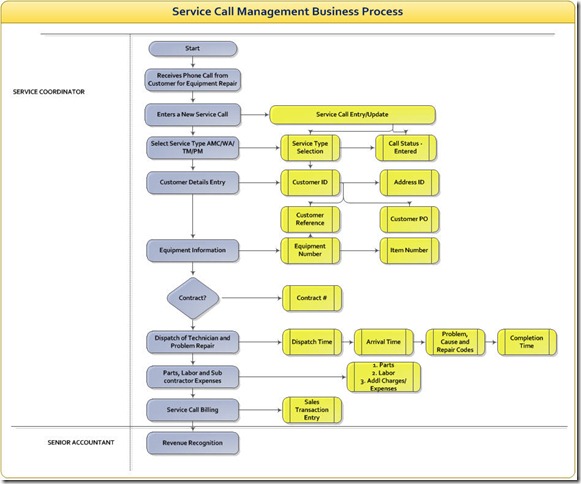
Service Call Management Process Chart

Image
A sample service Call Management process chart is provided below

ISV participation in Microsoft Dynamics Community

For those who doesn’t know what an ISV is, ISV stands for Independent Software Vendor that makes and sells software products which is added to platforms. Dynamics GP ISVs’ develop and sell extended applications to existing functionality of Dynamics GP or build industry verticals on Dynamics GP. In this article, I focus on the level of Dynamics GP ISVs’participation in Dynamics community and why it is required. Let me go back to a couple of my implementation experiences. Way back, I implemented Dynamics GP Financials for a client which is a large money exchange house. Their primary requirement to have Dynamics GP in house is to conduct an efficient automated bank reconciliation besides other core requirements which are not required for this example. I found the various bank reconciliation solutions offered by the standard Dynamics GP out of the box doesn’t fit well to this client as the client records the bank entries at the General ledger only. So I needed the functionality that can ...

Integration Manager hangs in GP2010–IV Resolved

This is the last post in this series of Integration Manager error in GP 2010 that started occurring since last week. The culprit was the Microsoft Connect gadget that caused this issue. It seems the slide causing this issue has been removed yesterday and the connect service has been restored which was having issues earlier. For more information, Visit Mariano’s blog who has provided the first hand information about the error. Integration Manager for Microsoft Dynamics GP 2010 hangs when running an integration - Follow up

Multicurrency Support in Project Accounting

Multicurrency is one important area and understanding it’s treatment in Project Accounting module of Dynamics GP is essential for a successful PA Implementation. Multicurrency is assigned in Billing currency ID in PA Originating currency is assigned for the contract first for it to be assigned to all projects under the contract. Later, the same currency is rolled on to projects. Currency for the contract and the currency for any or all of the projects under the contract cannot be different. Example: If Currency for Contract A is USD, Currency for Project A1 under contract A cannot be assigned to CAD and instead uses USD. Change orders are not supported by Multicurrency. In other words, change order tracking will be disabled if an originating currency other than functional currency is used in Contract as well as Project. Profit Types of Billing Rate and None are the only profit types that can be used on Multicurrency billing proj...

Integration Manager hangs in GP 2010: III

Well. Someone looking at the title of the post can sense how important this topic seems to be. This is the third post in a row on the same topic. In fact this became a hot topic on community. It is worth to mention here that I’m receiving significant traffic from Google and Bing search specific to this error for the past 2 days. In the other two posts, I have covered generic troubleshooting segments for the error. Some latest information is pouring into the community about this error that this behavior is due to a Microsoft .Net framework  update. IM is now designated as Hot topic by Microsoft which started occurring early last week. Complete information is available on this hot topic following the link here Integration Manager for Microsoft Dynamics GP 2010 is Unresponsive at the Beginning or End of an Integration   The above link requires customer source login. More information is available on Mariano Gomez Blog link here . Thanks to Mariano for providing this infor...

Integration Manager crashes - II

This article is a continuation of another article Integration Manager crashes published in July. I observed that the Integration Manager is hanging specially in GP2010 even in normal GP client. The behavior is such that after running an integration, the Dynamics GP screen fails to open up and dynamics.exe continue to be seen as active under processes in Windows Task Manager. Killing this process serves no good. Possible Resolutions 1. I cannot be specific on the resolution as I have not personally experienced the error so far. 2. When we upgrade GP2010, GP2010 is installed as a separate instance and GP10 instance continue to exist and so is the case with Integration Manager for GP10. 3. In some cases, this IM instance is left installed and the same instance will be used to run the integrations on GP2010. This can lead to errors. Always ensure latest IM is installed with the required service packs. 4. It is recommended to uninstall GP10 and old IM instances from the computer ...

How to Un-Receive Items in GP2010: Video Tutorial

Image
I’ve written an article titled Purchase Returns Treatment Enhancements in GP 2010 that describes several scenarios of making purchase returns in Dynamics GP2010. This article is further strengthened by adding a video tutorial on one of the scenarios explained in the article. I’ve just started creating videos so don’t expect much out of it as I’m still learning but enjoying this new found hobby. Watch the Video here below (For better quality view in 720p HD) Un-Receive Items in GP2010

Edit PO Status Enhancement in GP2010

Image
In my earlier article I discussed the Purchase Returns Treatment Enhancements in GP 2010. In line with this article, I’m showing another enhancement to Edit Purchase orders window. Compare the screens for yourself with the changes In GP 10 In GP2010 In GP2010, Quantity replaced field is added which wasn’t available in GP10. The Quantity replaced field works in conjunction with the Returns Transaction Entry marked with Replace Returned Goods option.

Purchase Returns Treatment Enhancements in GP 2010

Image
In GP2010, there are a couple of enhancements made to Returns Transaction processing in Purchase order processing module. These enhancements are 1. Option to mark Replace returned goods 2. Option to mark Invoice expected for returned goods. Let us see how these options would affect the order processing. Options When to use Results Replace Returned Goods and Invoice Expected for Returned Goods 1. When you want to replace the returned goods, using the original purchase order. 2. When you have yet to process the invoice for the original goods. When you want to process an invoice for all of the original quantity of goods received (even though you have returned some of them). 1.Returned goods are replaced. The same purchase order is used for the replaced goods. ...

How to Remove Analytical Accounting from Dynamics GP

Someone was asking me recently how to remove Analytical accounting completely from Dynamics GP 10 or 2010 for all companies. Here comes the detailed mechanism to do that. 1. Go to Add/Remove Programs 2. Select Microsoft Dynamics GP 10.0 (or Microsoft Dynamics GP 2010) from the list of programs and click change 3. Click Add/Remove Features 4. You’ll see Analytical Accounting is marked in select features window. Click Do not Install feature in AA Click Next and click finish. 5. Download the following scripts from Partner source or Customer source SQL Script 1 SQL Script 2 6. Run the above scripts in SQL Server Management Studio against DYNAMICS database. 7. Run the following statement against DYNAMICS Database in SQL Server Management Studio Delete DB_Upgrade where PRODID='3180' Delete DU000020 where PRODID='3180’ IMPORTANT: Please take backups of both databases and application folders prior to the uninstall process. ...

Management Reporter Migration: My Take

When I had the first look at the management reporter, I’m quite impressed with its clean interface. I still remember when I wanted to install this piece of application on my Lenovo T410 ThinkPad, I was at home. I thought it is another windows executable straight installation. I was wrong and quickly realized it requires an active domain presence to even install it unlike other Microsoft applications which strictly ask for domain, but still allow us to install on a computer enabled with domain not necessarily asking us to be connected to the network. One such example is Dynamics AX. Not necessarily all customers working on Dynamics GP own a domain network as they feel comfortable with a workgroup environment. Neither Dynamics GP nor the traditional FRx software forced them to upgrade the network to a domain till date and both of them proudly tell the customer to feed them with a domain and happy with wherever they are dumped. Thanks to their simplicity and modesty. However, FRx, sho...

How to Install GP2010 R2 VPC on Windows 7

Image
This article contains the detailed steps to install GP2010 R2 VPC on Windows 7. Please do note that the GP2010 R2 VPC is available to partners exclusively for download on partnersource. I. Download GP2010 R2 VPC Images 1. Download GP2010 R2 RTM Technical demonstration toolkit from partnersource following the link below. (This is the final 32-bit VPC for Dynamics GP and future VPC will be on 64-bit Hyper-V Images) Don’t worry. I’ll cover how to install the 64-bit VPC on Windows 7 with an alternate to Hyper-V as and when released. As I wrote this article, I noticed that I’ve downloaded and configured GP2010 R2 Core plus Beta VPC. Below link is for GP2010 R2 RTM image download. I don’t think anything would have changed in installation and configuration of the same. Please let me know if you have problems configuring the VPC with below instructions to update the same here. Microsoft Dynamics GP 2010 R2 RTM Technical Demonstration Toolkit 2. Unzip the contents to your local drive or...

Dynamics GP Online services DLL Error

Image
Quite recently I installed Encumbrance Management module through Add/Remove Programs menu in Dynamics GP 2010 R2 DVD. The installation was simple and fine. I ran utilities and logged into to Dynamics GP using sa. It logs me in successfully however parallel to the login process, the error below is surfaced. Microsoft.Dynamics.GP.Online services.dll: The type initializer for Microsoft.Dexterity.Applications.root threw an exception.InnerException: parameter name ProductID. Resolution I did a Repair on Dynamics GP 2010 R2. I logged back. The error didn’t' surface again. The cause of the error is unknown though I know it is due to Dynamics GP online services.

Inventory HITB Smart list download: Update

I updated the Historical Inventory Trial Balance Smart list Builder report to version 1.1. In this version, the following changes are made to the earlier version 1.0 . Added Excel Report Builder Report in addition to SLB Report. So, You can easily explore the results in Excel directly instead of exporting to excel every time. Added GL Balance as a calculated field which is a Net Balance field of Debit and Credit amounts on GL side of the report so as to easily compare against Extended cost field on Inventory side Added Account Description field to the Inventory and Inventory offset accounts. In Excel Report Builder for GP 10, we can arrange the fields using columns option so I have arranged the fields in Excel report but for smart list, I suggest to arrange fields globally by going to smart list options in System setup. This is not an issue in GP 11 though as we have options in GP 11 for the same. Separate Report is provided for...

How to Enter Analytical Accounting Negative beginning balances

In Analytical Accounting, the dimensions and corresponding codes are always linked to the General ledger accounts. Analytical transaction are triggered only when a GL distribution is being made in any of the modules of GP which is supported by AA. Hence, We cannot post to AA without actually posting to GL Accounts. What if we have a situation to enter AA negative balances? We know that AA does not support entering negative balances. In this post we will see in which scenarios we will encounter the possibility of entering negative balances and how we can achieve this functionality through a workaround while respecting the business logic of AA. Scenario A client is migrating their balances to GP and as part of the migration, the account framework is changed to a new structure. As part of the new structure, they would like to maintain their employee loan balances in AA linked to 1 main GL Account for Employee Loans & Advances. In their old system on the contrary, each of the emplo...

Dynamics blogger Video channel on You tube

Image
I remember those days past a year or so when I created Twitter account where I started syndicating the GP blog posts and later did a lot experiments like Facebook group, MSdynamicswire.com website and network creation.  dynamics blogger.com is another new addition that is created recently quarter ago. Although not all experiments are successful, yet, I derive some learning out of each experiment and I enjoy it. Now comes another experiment that is Dynamics Blogger YouTube video channel. I realized presenting your thoughts in a video format is much easier than writing long sentences. However, I must say I also realized how tough it is to create a video of your own but I’m confident I’ll learn it the hard way in due course of time. Here comes the latest videos on the channel. Dynamics GP 2010 Auto Login – This video shows few steps to activate this feature Excel And Dynamics GP Export Solutions in Smart list – This video shows how to use export solutions in smart list w...

Analytical Accounting: Dimension Code Macro

Macro to enter new dimension codes in Analytical accounting module is provided below. TypeTo field aaTrxDimCode , ' CODE '   MoveTo field Inactive  # 'FALSE'   MoveTo field aaTrxDimCodeDescr   TypeTo field aaTrxDimCodeDescr , ' CODE DESCRIPTION1 '   MoveTo field aaTrxDimCodeDescr2   TypeTo field aaTrxDimCodeDescr2 , ' CODE DESCRIPTION2 '   MoveTo field aaNode   MoveTo field 'Lookup Button 3'   ClickHit field 'Lookup Button 3' NewActiveWin dictionary 'Analytical Accounting'  form aaTreeNodeLookup window Main   DblClickHit field '(L) TreeView' item 1  # ' NODE ' 1 NewActiveWin dictionary 'Analytical Accounting'  form aaTrxDimensionCodeMnt window Main ActivateWindow dictionary 'Analytical Accounting'  form aaTrxDimensionCodeMnt window Main   MoveTo field 'Save Button'   ClickHit field 'Save Button' ...

Integration Manager crashes

Sometimes we might not be that lucky to get through with our imports through Integration Manager remotely. A remote session will kill the ongoing Integration and leave the Dynamics GP running despite the crash. I’ve made interesting observations that will save your time next time you encounter the same for some reason. 1. Integration Manager crashes while doing the integrations using terminal server or Citrix like environment. Or for that matter applications like Team viewer, LogmeIn so on. 2. It will crash only when we try to do the integrations using Integration Manager standard destination adapter that requires Dynamics GP session to be on. This doesn’t happen for IM eConnect adapter. 3. This happens when the integration tries to open another GP window during the course of Integration. Troubleshooting 1.There is no proven solution to the above problem. 2. However when it happens, the first thing to do is to go to Task Manager and kill Dynamics.exe process that keeps runn...

Sales Orders Import: Location ID does not exist

While importing sales documents in Dynamics GP through Integration Manager or eConnect, We encounter the following error message. Microsoft.Dynamics.GP.eConnect:  Number = 287  Stored Procedure taIVTransactionLineInsert  :  Description = Location ID/Site ID (TRXLOCTN) does not exist in Site/Location Setup - IV40700 When we see this error, Our immediate focus would be on Quantities/Sites window where the Item number should be assigned to the relevant site ID in import. However, In some cases the integration fails despite assigning the site to the item number. Reason for this error would be due to the presence of Kits. If any of the line items contain Kits and we receive this error, We shall go to the Kit components and check if the components are assigned to the respective sites in import. In one of my imports earlier, I’ve struggled for 4 hours struggling to find which item was not assigned to the site. After constant trials, I found the problem lies in the kit...